Se afișează postările cu eticheta twitter. Afișați toate postările

marți, 15 mai 2012

Avast Warns About “FakeInst” and Alternative Android Markets


The large number of malicious websites designed to infect Android devices with the well-known Android:FakeInst SMS Trojan have made Avast security experts issue another warning to alert users of its presence. They also advise smartphone owners to beware of shady-looking alternative Android app markets.

Researchers have found several domains, such as t2file.net and uote.net, which store at least 25 new apps that mask the piece of malware.

After users are lured onto these websites, they’re presented with a phony Downloader program. The truly evil thing about this app is that it tells the victim that the operation may cost money, but the Quit button doesn’t work.

Once the installation process begins, there’s nothing you can do, but click on the Agree or OK buttons. Of course, there are methods to stop the task, but to the untrained user it appears as he/she has no other choice.


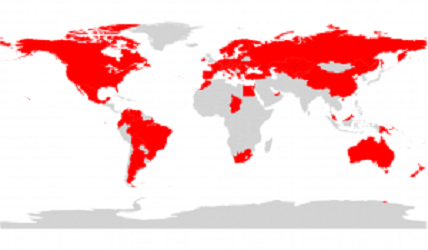
What is even more worrying is the fact that once one of these buttons is pressed, an SMS to a premium rate number is already sent out. To make matters worse, the Trojan contains premium numbers for around 60 different countries worldwide, which means that if the victim isn’t located in Antarctica, he/she will most likely end up with an inflated phone bill.

In order to prevent experts from analyzing the malware, its creators have used AES encryption to make the file inaccessible.

Each SMS sent out by Android:FakeInst costs around $4 (3 EUR), which means that the cybercriminals behind this operation can earn considerable amounts of money from users who make the mistake of downloading software from alternative markets.

“Never trust weird looking alternative markets and always check the app permissions. If you’ve downloaded a game that asks for SMS and Phone calls permissions, it probably means that someone is about to “play you” instead,” Avast’s Alena Varkočková explained.


softpedia.com

Fake Android Antivirus Served via Twitter Spam


Security researchers warn that Twitter is being flooded with shady looking posts that contain links to websites hosted on .tk domains. These websites hide malicious elements that target not only PC users, but also Android owners.

GFI Labs experts report that while PC users are served broken .jar files, Android customers are tricked into installing a fake antivirus application whose icon replicates the one of products provided by Kaspersky.

So let’s take a look at how these schemes work.

First, the cybercriminals post tweets in Russian or English that advertise all sorts of materials, mainly adult content. All the tweets contain a link to a site such as “good-graft.tk.”


Once clicked, the links open a Russian site that’s designed for both smartphone and computer owners. Depending on the device from which the website is accessed, the potential victim is served a file called VirusScanner.jar (for PC), or VirusScanner.apk (for Android).

As mentioned before, experts revealed that the .jar file seems to be broken, since an error is displayed when it is executed. However, this may change at any time, so internauts should be wary when presented with such an element.


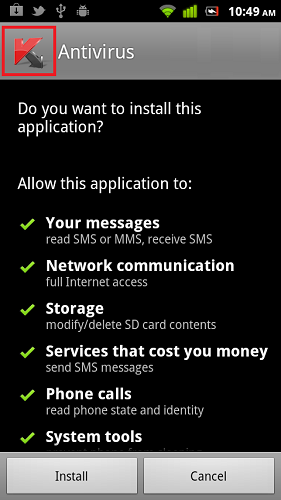
VirusScanner.apk is a rogue antivirus application which displays the Kaspersky logo when it is installed.

Identified as Trojan.Android.Generic.a by GFI’s VIPRE Mobile Security, the piece of malware reveals its true purpose during the installation process when it asks permission to access phone calls, messages and even services that cost money.

We strongly advise you to refrain from clicking on links contained in Twitter posts if they look suspicious. Furthermore, site addresses that end in .tk are usually a good indicator of a malicious plot.

On the other hand, even if you do end up on a shady site, at least make sure you don’t install anything that’s pushed to your device.

Finally, although many argue that mobile threats are not yet so popular, users should learn to treat their smartphones just as they do their computers and install antivirus solutions from legitimate and reputable companies.


softpedia.com